High-Level Architecture
Architecture Diagram
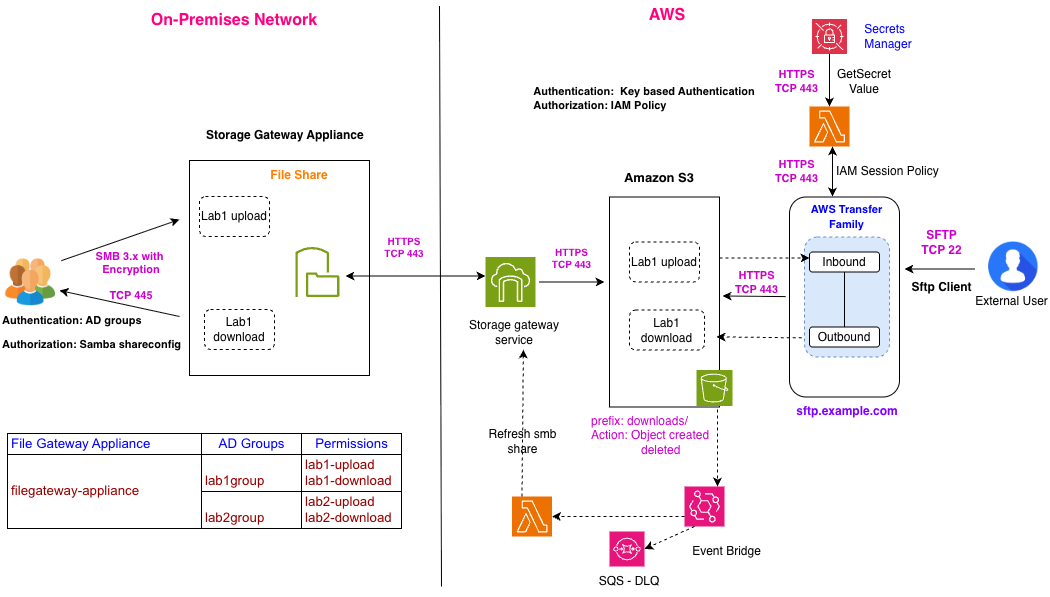
On-premises lab users access a file share via a File Gateway Appliance, which synchronizes with Amazon S3. External partners connect over SFTP via AWS Transfer Family, which reads/writes the same S3 bucket. An event-driven pipeline (EventBridge, Lambda, SQS) keeps the on-premises share in sync with files uploaded externally.
Core Components
1. File Gateway (on-premises bridge)
- Presents a standard SMB file share to on-premises systems and lab instruments.
- Backed by cloud object storage — files written to the share are uploaded to the cloud, and vice versa.
- Uses a dedicated local cache disk to provide low-latency read/write access to recently used files, and to temporarily stage outbound data before it is uploaded to cloud storage.
2. Central Object Storage
- Acts as the single, central storage layer and source of truth for all file flows — both the on-premises share and the external SFTP endpoint read from and write to the same underlying storage.
- Each logical directory (per-lab, per-partner) is mapped to its own storage prefix, providing a natural isolation boundary.
- Acts as an event source, triggering downstream automation whenever objects are created or deleted.
3. Managed SFTP Endpoint
- Provides a managed SFTP endpoint for external partners, removing the need to operate and patch a dedicated external-facing file server.
- Files are written directly to central object storage — no intermediate hop or local disk on the SFTP service itself.
- Each external partner is isolated to their own storage prefix(es). For partners requiring a higher degree of separation, a dedicated, separate storage bucket can be provisioned per partner instead of sharing a bucket under different prefixes.
4. Event-Driven Synchronization Layer
- Object-created/deleted events on relevant storage prefixes are published to an event bus.
- An event handler reacts to these events and triggers a targeted cache-refresh action against the File Gateway, scoped only to the affected folder.
- Failed or unprocessed events are captured in a dead-letter queue rather than being silently dropped.
Why Event-Driven Synchronization Is Used
This layer is needed specifically to synchronize files transferred in via SFTP — files written by external partners bypass the File Gateway, so this mechanism ensures they still become visible on the on-premises share. Without it, the gateway's own scheduled refresh defaults to a minimum interval of 5 minutes, introducing avoidable delay before externally uploaded files appear on-premises.
Upload flow (on-premises → external partner)
- A lab user writes a file to the upload folder on the on-premises file share.
- The File Gateway Appliance replicates the file to the cloud gateway service.
- The gateway service writes the corresponding object into central object storage.
- The external partner connects to the SFTP endpoint (key-based authentication) and, once authorized, reads the file — read-only access to this directory.
Download flow (external partner → on-premises)
- The external partner connects to the SFTP endpoint and writes a file into their designated outbound directory.
- The SFTP service writes the object directly into central object storage, bypassing the File Gateway Appliance.
- An object-created event triggers the event handler, which issues a targeted cache-refresh request scoped to the affected folder.
- The File Gateway Appliance refreshes that folder, making the file visible to on-premises users almost immediately.
- On-premises lab users read the file from the on-premises share.
- If the refresh event fails to process, it is captured in the dead-letter queue for investigation rather than being lost.
Resilience Notes
- Routine appliance restart: The local cache disk is persistent, so its contents survive a normal restart. Pending uploads resume automatically once the appliance is back online — no manual reconciliation required.
- Cache disk failure: If the cache disk itself becomes unavailable or corrupted, the affected file share is taken offline to protect consistency. Data already uploaded to central storage remains fully available; data still pending upload in the local cache at the time of failure may be lost — for this reason, central object storage, not the local cache, is treated as the durable source of truth.